
CUDA with Python
CUDA support is inbuilt into many Pythonistic libraries with RAPIDS. In addition, many domain specific libraries are now enabled with CUDA. Also checkout Andy's PyData 2025 talk at https://www.youtube.com/watch?v=Gzp8CdOztTE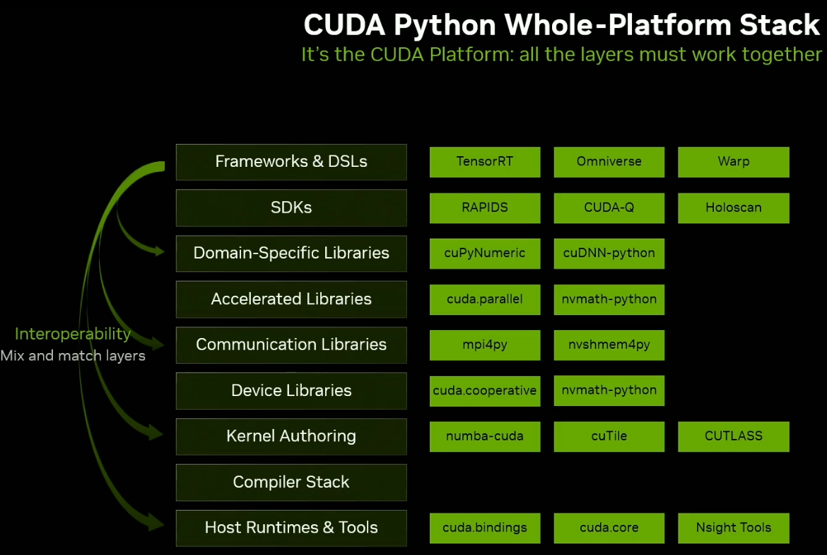
…The number of L1 cache banks used depends on the number of texels that must be accessed in parallel…
https://graphics.cs.utah.edu/research/projects/high-order-interpolation/highorderinterpolation.pdf
From “Hardware Adaptive High-Order Interpolation for Real-Time Graphics”, D.Lin et al, HPG, 2021
The A100 GPU includes 40 MB of L2 cache, which is 6.7x larger than V100 L2 cache.The L2 cache is divided into two partitions to enable higher bandwidth and lower latency memory access. Each L2 partition localizes and caches data for memory accesses from SMs in the GPCs directly connected to the partition. This structure enables A100 to deliver a 2.3x L2 bandwidth increase over V100
The larger and faster L1 cache and shared memory unit in A100 provides 1.5x the aggregate capacity per SM compared to V100 (192 KB vs. 128 KB per SM) to deliver additional acceleration for many HPC and AI workloads.
conda install pytorch torchvision torchaudio cudatoolkit=10.2 -c pytorch
This ensures a pytorch version that is compatible with CUDA, ie, the package name looks like "pytorch-1.7.1-py3.7_cuda102_cudnn7_0" is installed.
Note - the version "pytorch 1.7.1 py3.7_cuda102_cudnn7_0 pytorch" supports the below compute capabilities - sm_37 sm_50 sm_60 sm_61 sm_70 sm_75 compute_37. To check the compute capability of the GPU, refer to https://gpupowered.org/mygpu/
A simple web browser-based mechanism to identify the sm version of GPU used on a desktop. This information is required for compiling .cu kernels.
User "Bhaal_spawn" has created a fan page for voodoo, a first of its kind 3D accelerator, using LEGO bricks.
https://ideas.lego.com/projects/480e824e-d651-4192-996a-937eb7b4fe98
TPOT is a partial Automated Machine Learning toolkit, that can "discover" pipelines given a data-set, including optimal feature engineering, and the pipeline itself. A detailed comparison with manual tuning is necessary here.
|
The following code illustrates how TPOT can be employed for performing a simple classification task over the Iris dataset.
Running this code should discover a pipeline (exported as |
When moving from versions below 2.3.0 to Tensorflow 2.3.0 (rc0/rc2/release) - the below error might be faced.
|
.This is because, TF team took the decision to support only compute capability 7.0, to reduce binary sizes of distribution.
This is outlined in the GPU section of the release notes at,
https://github.com/tensorflow/tensorflow/releases/tag/v2.3.0 - TF 2.3 includes PTX kernels only for compute capability 7.0 to reduce the TF pip binary size. Earlier releases included PTX for a variety of older compute capabilities.
gl-transitions.com provides great special effects for transitions from one surface to another using glsl (ES) shaders. This is targeted for WebGL applications, but thinking about it, why not in native (C++) applications ?
Wrote up this post about how to integrate these shaders directly into native code, using nengl, a wrapper for OpenGLES2 applications. This is using OpenGL ES with EGL context on windows desktops via glfw3 and libANGLE.
Check out the code in github for a Windows application using libANGLE at,
https://github.com/prabindh/nengl
And a more detailed post at,
https://medium.com/@prabindh/using-gl-transitions-for-effects-9e73abfc8fd5
Note - this can be used as is on Linux and other platforms that support OpenGLES2 or OpenGLES3.
Windows Subsystem on Linux (WSL2) provides a way to use Linux functionality in Windows itself, by running a Linux Kernel in Windows.
This month, Nvidia and Microsoft announced availability of CUDA API in WSL2, as part of the Insider Preview. This enables CUDA based applications to run in Linux on WSL2, on Windows.
Note: These are command line applications.
More info at,
https://docs.microsoft.com/en-us/windows/win32/direct3d12/gpu-cuda-in-wsl
https://ubuntu.com/blog/getting-started-with-cuda-on-ubuntu-on-wsl-2
If you are using Docker version 19.03.5 and nvidia-docker, the installer.py is not setup to check the GPU installation correctly. This can result in errors below and a failed installation, even if docker works correctly with GPU in other applications/container use-cases.
"docker does not have nvidia runtime. Please add nvidia runtime to docker or install nvidia-docker. Exiting..."
Installer.py requires the changes below for successful installation.
https://github.com/prabindh/parabricks-changes/commit/b39f61b8512240bd8c3e7a903f09326fb029893f
Or the complete file below.
https://github.com/prabindh/parabricks-changes/blob/master/installer.py

Further steps in the germline pipeline work as per documentation,
Steps in the Pipeline:
Alignment of Reads with Reference
Coordinate Sorting
Marking Duplicate BAM Entries
Base Quality Score Calibration of the Sample
Apply BQSR for the Sample
Germline Variant Calling
Read more at,
https://www.parabricks.com/germline/
Analysis of Genomic data with Parabricks
NVIDIA PARABRICKS
Analyzing genomic data is computationally intensive. Time and cost are significant barriers to using genomics data for precision medicine.
The NVIDIA Parabricks Genomics Analysis Toolkit breaks down those barriers, providing GPU-accelerated genomic analysis. Data that once took days to analyze can now be done in under an hour. Choose to run specific accelerated tools or full commonly used pipelines with outputs specific to your requirements.
https://www.developer.nvidia.com/nvidia-parabricks
Options for effectively using nvenc and nvdec
From this presentation http://on-demand.gputechconf.com/gtc/2018/presentation/s8601-nvidia-gpu-video-technologies.pdf explains the various nvenc and nvdec and pre/post processing options available via the HW engine, and CUDA API. Target 490 fps on a GP104 GPU for a Transcode session.
In addition, various tools to debug the usage, via nvidia-smi dmon command are explained.
Using Locally Sensitive Hashing (LSH) to reduce training time
From this rice university paper at MLSys 2020 https://www.cs.rice.edu/~as143/Papers/SLIDE_MLSys.pdf, the authors present a method for fast training to required levels of accuracy, using LSH, for Extreme classification tasks (ex Amazon670 etc)
LSH was introduced in this paper "LSH-SAMPLING BREAKS THE COMPUTATIONAL CHICKEN-AND-EGG LOOP IN ADAPTIVE STOCHASTIC GRADIENT ESTIMATION
Tip for preventing Google Colab from disconnecting
From https://www.hackster.io/bandofpv/reading-eye-for-the-blind-with-nvidia-jetson-nano-8657ed
During long operations (ex Training a model), to prevent Google Colab from disconnecting to the server, press Ctrl+ Shift + I to open inspector view. Select the Console tab and enter this:
function ClickConnect(){
console.log("Working");
document.querySelector("colab-toolbar-button#connect").click()
}
setInterval(ClickConnect,60000)
Rapids cudf improvement on large CSV groupby
Test case at - https://github.com/prabindh/deepnotes/blob/master/rapids/cudf-test.pySelected chunk size: 1000000
Running CPU, size = 1000000
Pandas Groupby Time = 0.5486793518066406
Pandas Groupby Time = 0.0010442733764648438
Pandas Groupby Time = 0.0006716251373291016
Pandas Groupby Time = 0.0006544589996337891
Pandas Groupby Time = 0.0006563663482666016
Running GPU, size = 1000000
Cudf Groupby Time = 0.015185356140136719
Cudf Groupby Time = 0.0007460117340087891
Cudf Groupby Time = 0.0007538795471191406
Cudf Groupby Time = 0.0006649494171142578
Cudf Groupby Time = 0.0006606578826904297
DeepOps framework for deploying GPU clusters
From https://github.com/NVIDIA/deepops
The DeepOps project encapsulates best practices in the deployment of GPU server clusters and sharing single powerful nodes (such as NVIDIA DGX Systems). DeepOps can also be adapted or used in a modular fashion to match site-specific cluster needs. For example:
Nvidia-Docker setup on Ubuntu 18.04.3
This link contains steps for installing Nvidia GPU enabled GPU, on Ubuntu 18.04.3
https://github.com/prabindh/deepnotes/blob/master/docker-18.04.3/docker.txt
Output of the nvidia-smi command running in the container should look like below 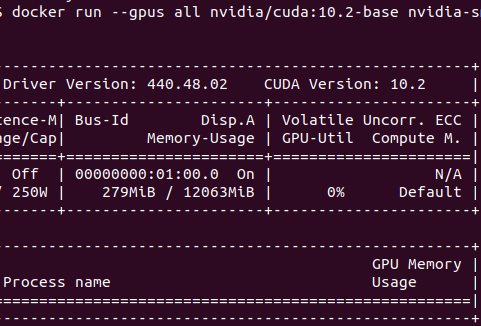
Rapids support
Rapids framework is available on Linux, most recent being the 0.11 version. Get the framework corresponding to preferences via the configurator at,
https://rapids.ai/start.html
Rapids framework is not available on Windows, and will show the error "PackagesNotFoundError: The following packages are not available from current channels". For the reasoning on why Rapids is not available via pip, due to the manylinux related issue, read more at https://medium.com/rapids-ai/rapids-0-7-release-drops-pip-packages-47fc966e9472
With API changes happening frequently, it becomes important to have the installed API handy and readily available for reading. Is it possible to do it without going online ?
Since Tensorflow documents are generated from existing code, pydoc can be used to perform "man" like commands on the Python terminal following steps below
1. Install pydoc via pip or other tool
2. Invoke pydoc as below on the desired API to be looked up
$ pydoc tensorflow.data.Dataset
This results in below display
"Help on class DatasetV2 in tensorflow.data:
tensorflow.data.Dataset = class DatasetV2(tensorflow.python.training.tracking
.base.Trackable, tensorflow.python.framework.composite_tensor
.CompositeTensor) |
tensorflow.data.Dataset(variant_tensor) |
| Represents a potentially large set of elements."
By default OpenCV4 does not enable package config (pkg-config pc files) generation anymore. But in 4.1.0 atleast, we can force enabling this during configure as below.
$pkg-config --cflags opencv4
-I/usr/include/opencv4/opencv -I/usr/include/opencv4
$ pkg-config --libs opencv4
-lopencv_aruco -lopencv_bgsegm -lopencv_bioinspired -lopencv_ccalib -lopencv_dnn_objdetect -lopencv_dpm -lopencv_face -lopencv_freetype -lopencv_fuzzy -lopencv_gapi -lopencv_hfs -lopencv_img_hash -lopencv_line_descriptor -lopencv_quality -lopencv_reg -lopencv_rgbd -lopencv_saliency -lopencv_stereo -lopencv_stitching -lopencv_structured_light -lopencv_phase_unwrapping -lopencv_superres -lopencv_optflow -lopencv_surface_matching -lopencv_tracking -lopencv_datasets -lopencv_text -lopencv_dnn -lopencv_plot -lopencv_videostab -lopencv_video -lopencv_xfeatures2d -lopencv_shape -lopencv_ml -lopencv_ximgproc -lopencv_xobjdetect -lopencv_objdetect -lopencv_calib3d -lopencv_features2d -lopencv_highgui -lopencv_videoio -lopencv_imgcodecs -lopencv_flann -lopencv_xphoto -lopencv_photo -lopencv_imgproc -lopencv_core
Current working version that is supportive of recent research works
CenterNet uses center-points instead of typical bounds of region of interest. Since the default build is on Linux, this post updates the steps for Windows. link https://github.com/prabindh/deepnotes/tree/master/CenterNet, this is derived from xingyizhou et al , CenterNet. Steps and results of Webcam demo updated. GPU loading is 70% (Quadro1000M) at approx 30 fps using default Python code. Refer GPU-z logs in the same folder.https://github.com/prabindh/deepnotes/blob/master/CenterNet/centernet-GPU-Z%20Sensor%20Log.txt
Windows port of CenterNet https://github.com/prabindh/deepnotes/tree/master/CenterNet
One of the most time consuming tasks in object detection using deep learning frameworks like Yolo or Caffe, is the manual labelling.
This post shows how to perform labelling automatically with euclidaug and complete the detection task using Yolo in under one hour of work (including autolabelling), for a 3-class model of electronic capacitors in a PCB (Printed Circuit Board). Methods for Squeezedet (that uses the KITTI output mode of euclidaug since squeezedet uses KITTI format) are also shown.
Binaries for Yolov3, for Nvidia Tegra Nano, based on Ubuntu Linux available in the Jetson Nano Linux image, now available at the repository
Magenta and its applications (music transcribing - https://piano-scribe.glitch.me/) seem interesting, for the way the onset events in the music are calculated with LSTM, and how the metrics seem much better than previous sota.
Submitted by prabindh on Sun, 01/08/2017 - 19:05 / /
Just added a shared-library port of latest Darknet/Yolo framework, that enables easy integration into other frameworks like Qt5.
An example Qt5 application, with OpenCV3, and Darknet is built in below repository.
https://github.com/prabindh/qt5-opencv3-darknet
qt5yoloopencv3
Read more about Integrating Darknet/Yolo and OpenCV3, with Qt5 0 Comments
The proposed Qualcomm-Nxp-Freescale merger brings a new dimension in terms of GPU variants in the new entity - we have (1) The Vivante GC2000, GC880 series (IMX5,6), (2) The Adreno (erstwhile) Z series, and (3) Qualcomm's Adreno 3 series, Adreno 4 series, and Adreno 5 series.
How do they compare and who is going to win ? Read more at this linked in post
The Khronos chapter at Bangalore was inaugurated recently with participation from key companies - Samsung, Nvidia, AMD, TI, and many more startups and established companies. Read more at this Samsung page, and in this Khronos page . Panel discussion on how Khronos chapter can proceed further in coming years at this Khronos Youtube link
GPUPowered.Org was started as a WebGL experiment in 2010-11, when WebGL was still in its early stages. The tutorials setup has been used in various presentations every year. Ref http://ewh.ieee.org/r10/bangalore/ces/